.NET 10 LTS executable
A self-contained distribution for Linux x64 or ARM64, with the worker runtime included. The server uses the native dependencies of the supported Ubuntu version.
Automate maintenance for Ubuntu packages, applications and SDKs with a configurable catalog of 32 components. Record versions and results in SQL Server / Azure SQL and track each run in an infrastructure workspace with a read-only API for each server.
Illustrative demo. Logs use UTC; the timer uses Brasília time.
Try the workflow
Follow the worker’s decisions on Ubuntu: query, compare, update and audit. Choose a scenario and watch each stage unfold.
Simulation with sample data. These controls do not connect to your server or perform actual maintenance.
The installed version is checked again after the upgrade. The values in this table are illustrative.
| Component | Installed | Available | Result |
|---|---|---|---|
Docker Enginedocker-ce | — | — | Waiting |
.NET Runtimedotnet-runtime-10.0 | — | — | Waiting |
PostgreSQLpostgresql-16 | — | — | Waiting |
Ready to start
Start the simulation or move through it manually to understand each check.
The result will appear when the workflow finishes.
Why run PatchOps in production?
Manual maintenance can bring late-night surprises. PatchOps automates and audits every change.
A predictable routine. A history you can query.
From the database check to the maintenance result, see what happened in your environment.
A self-contained distribution for Linux x64 or ARM64, with the worker runtime included. The server uses the native dependencies of the supported Ubuntu version.
Version and result history over a TLS connection, with UTC timestamps. Each run is created before maintenance and completed as SUCCESS, PARTIAL or FAILED.
Waits for locks, applies timeouts and attempts to repair pending packages before updating. Catalog failures prevent the use of a potentially outdated index.
32 reference components across 18 applications and 14 SDKs and runtimes. Adjust the lists to your environment and track other packages changed by APT.
GitHub Actions workflows to test, build the package and deploy over SSH. Updating the installation preserves the connection configuration and existing schedule.
A systemd timer using America/Sao_Paulo, even on servers set to UTC. Installation validates the database before enabling the schedule; cron is also available.
Deployment strategy
Organize maintenance by environment: one monitored server, a read-only API and a workspace to track its results. Replicate this setup for the number of servers in your plan.
The worker runs the routine and records the audit in SQL Server.
Provides read-only access to versions, runs and results.
Displays the server overview and history on any screen.
Each deployment uses its own audit data source. The API and dashboard can be hosted separately from the server receiving updates.
Track your latest audit results and your environment’s history.
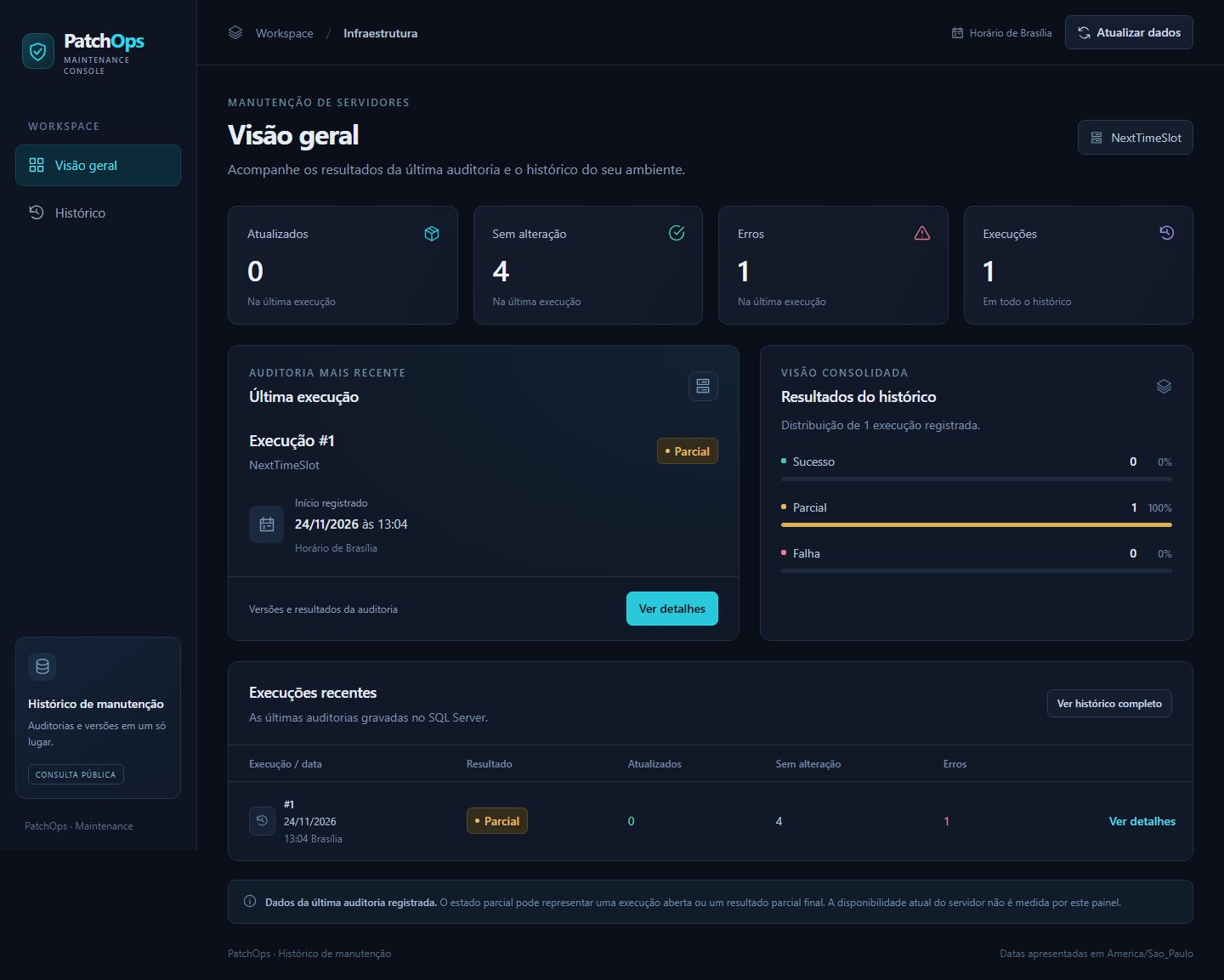
Desktop overview.
Enlarge screenshotView the latest audit counts, the recorded result and recent runs.
See how many components were updated, stayed on the same version or reported an error.
Filter runs by date range and result. Open the details to compare previous and recorded versions for each component.
View audit timestamps in Brasília time on both desktop and mobile.
This button fetches the available records again. Package maintenance follows the worker’s schedule.
The screenshots show a recorded audit in the product’s Portuguese interface. On the live dashboard, values reflect the data available at the time of your query. Scroll within the screenshot to explore the full screen.
32 components. One maintenance routine.
A reference catalog for Ubuntu 24.04, adjustable to your server’s installed packages and repositories. Other packages changed by APT are also recorded in the history.
Docker Engine, CLI, containerd, Buildx and Compose.
docker-cedocker-ce-clicontainerd.iodocker-buildx-plugindocker-compose-pluginPostgreSQL 16 and clients, Redis and RabbitMQ.
postgresqlpostgresql-16postgresql-clientredis-serverredis-toolsrabbitmq-serverNginx, GitLab CE, Git, curl, jq and SQL Server clients.
nginxgitlab-cegitcurljqmssql-tools18msodbcsql18.NET 10 LTS, ASP.NET Core, Node.js and OpenJDK 17.
dotnet-sdk-10.0dotnet-runtime-10.0aspnetcore-runtime-10.0nodejsopenjdk-17-jdkPython 3, virtual environments, pip, pipx and Go 1.26.
python3python3-venvpython3-pippipxgolang-1.26-goMaven for Java projects, PHP, CLI and Composer.
mavenphpphp-clicomposerAPT handles system packages, SDKs and services available in the configured repositories. The catalog lists categorize the audit; initial tool installation is handled separately.
Docker images, npm/Python libraries and .NET runtimes bundled with applications follow their own testing and deployment workflows. Next.js has an optional adapter for the configured project.
SQL Server / Azure SQL is the audit destination. SQLcmd and ODBC clients are included in the catalog; the managed database service is not updated by the server’s APT.
Prepare, validate and schedule your routine
Get the .NET 10 LTS package for Linux x64 or ARM64, compatible with Ubuntu 22.04 and 24.04.
Configure SQL Server with TLS and adjust the catalog to the applications, SDKs and runtimes installed in your environment.
The installer checks the database and enables the timer for 2 AM Brasília time. The cron option uses the server’s local time.
# Enter the SQL Server / Azure SQL connection with TLS
MAINTENANCE_SQLSERVER_CONNECTION_STRING='Server=tcp:sql.example.internal,1433;Database=PreventiveMaintenanceDb;User ID=maintenance_worker;Password=REPLACE_ME;Encrypt=True;TrustServerCertificate=False;'

# 18 applications and tools from the reference catalog
MAINTENANCE_APPLICATION_PACKAGES='nginx,gitlab-ce,git,curl,jq,docker-ce,docker-ce-cli,containerd.io,docker-buildx-plugin,docker-compose-plugin,mssql-tools18,msodbcsql18,postgresql,postgresql-16,postgresql-client,redis-server,redis-tools,rabbitmq-server'

# 14 SDKs, runtimes and build tools
MAINTENANCE_SDK_PACKAGES='nodejs,openjdk-17-jdk,dotnet-sdk-10.0,dotnet-runtime-10.0,aspnetcore-runtime-10.0,python3,python3-venv,python3-pip,pipx,maven,golang-1.26-go,php,php-cli,composer'

# Optional: directory of an installed Next.js project
MAINTENANCE_NEXTJS_APP_DIRECTORY=''

MAINTENANCE_APT_TIMEOUT_MINUTES=120
MAINTENANCE_APT_LOCK_TIMEOUT_SECONDS=60
The configuration file is restricted to root access. The timer preserves the server’s global time zone and requires the machine to be running at the scheduled time.
A license for every scale of operation.
Choose a plan that fits your infrastructure and replicate the API and workspace setup for each server.
For independent professionals with 1 VPS server.
For teams maintaining environments for multiple clients.
For businesses and IT consultancies with up to 6 servers.
Frequently asked questions